
Flight simulation has gone from niche hobby to mainstream obsession over the past few years. Between DCS World pulling in combat aviation fans and Microsoft Flight Simulator 2024 bringing civilian flying to stunning fidelity, the demand for physical controls has exploded. A keyboard and mouse will technically fly an aircraft, but it is like driving a sports car with oven mitts on. You lose the fine control that makes sim flying rewarding.
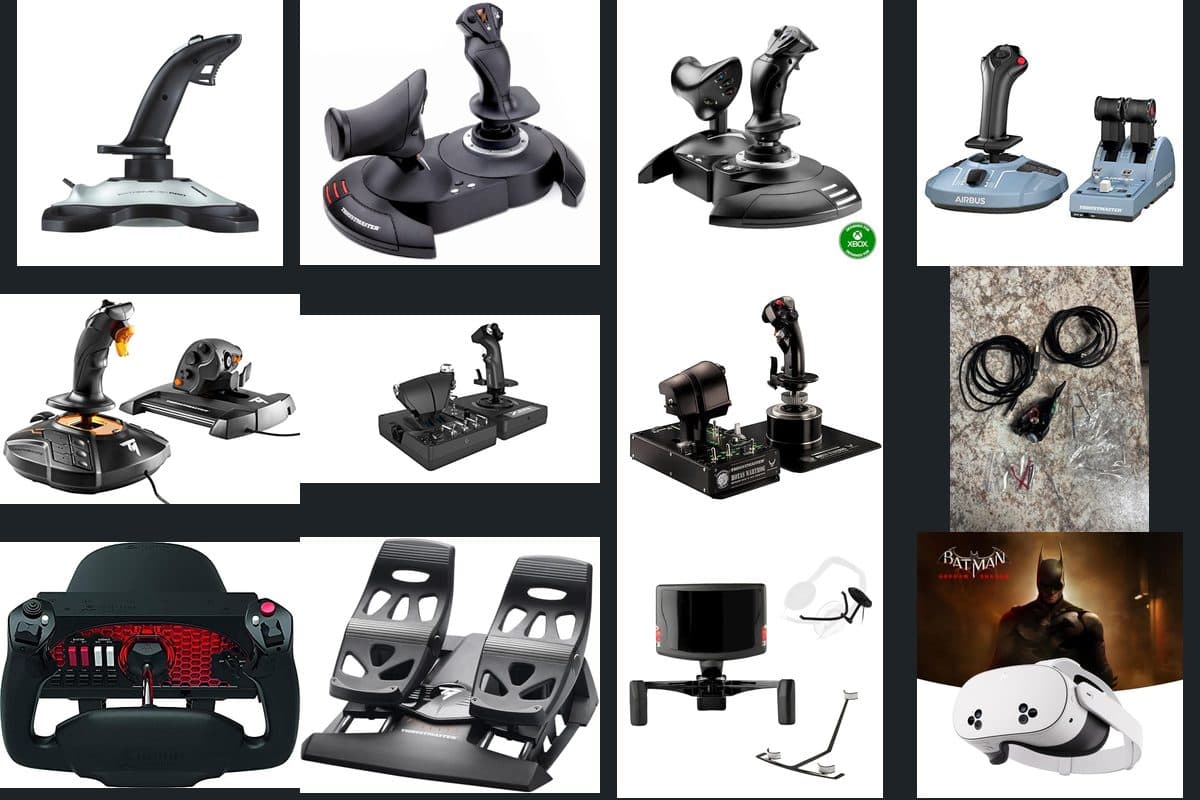
This guide covers 20 products across seven categories, from a $33 joystick that is a perfectly reasonable starting point to a $625 full-metal HOTAS built for long DCS campaigns. Every pick has been selected based on build quality, sensor accuracy, software ecosystem, and real-world durability reports from the sim community. If the stick drifts after six months or the throttle develops a dead zone, you will read about it here.
Already have your cockpit sorted and looking for related gear? Check our aviation radio scanners guide for monitoring real traffic, our airshow essentials guide for live events, or our Father's Day gifts guide for the military enthusiast who already has everything.
T16000M FCS HOTAS
~$165


Logitech PRO Flight Yoke
$165 on Amazon
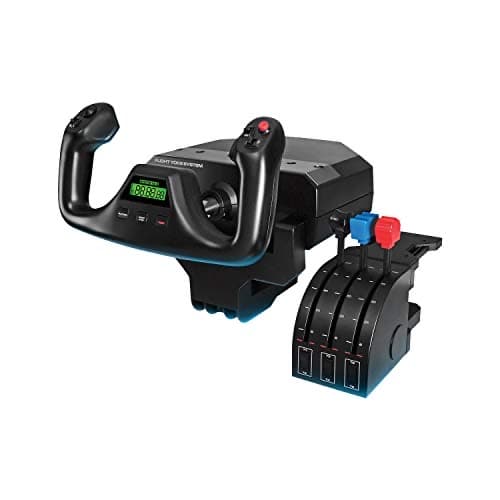
A desk-mount yoke with push-pull and rotation axes, built-in USB hub for connecting throttle quadrants and panels, and stainless steel shaft.
Entry-Level Sticks & HOTAS ($33 - $70)
Starting out in flight sim does not require a second mortgage. These three options cover the basics: axis control, hat switches, and enough buttons to bind the essentials. The build quality is mostly plastic, and you will feel the difference compared to a $200 setup, but they are functional enough to learn on and decide whether this hobby is for you before going deeper.
Logitech Extreme 3D Pro
~$33 on Amazon
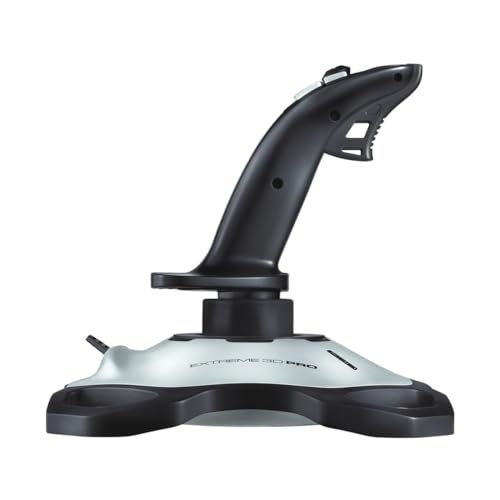
A standalone twist-axis joystick with 12 programmable buttons and an 8-way hat switch. No throttle unit included, but the base has a built-in throttle slider.
Best for: First-time simmers testing the waters before committing to a full HOTAS
Logitech has sold this stick for over a decade, and there is a reason it keeps showing up in beginner recommendation threads. The twist axis handles rudder input without pedals, the 12 buttons cover most essential bindings for a single-engine aircraft, and the weighted base stays put on a desk without clamps. Where it struggles is precision at the center of the stick travel. There is a noticeable dead zone near neutral that requires software curves to tame, and the throttle slider on the base is small, stiff, and awkward to reach mid-flight. It is a $33 stick and it feels like one, but it gets you flying and that is the whole point at this stage.
Thrustmaster T-Flight HOTAS X
~$55 on Amazon
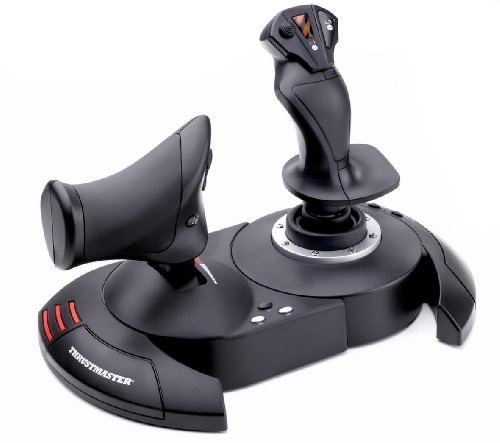
A two-piece HOTAS with detachable throttle and stick. Compatible with PC and PlayStation. Five axes and 12 buttons with a programmable mapping system.
Best for: Budget-conscious buyers who want a separate throttle unit without spending over $60
At $55, the HOTAS X is the cheapest way to get a proper stick-and-throttle combo. The throttle detaches from the stick base via a cable, letting you space them apart on your desk for a more natural arm position. Thrustmaster's T.A.R.G.E.T. software handles button mapping and axis curves, which is a genuine advantage over the Logitech at this price. The weakness is the throttle rail. It uses a plastic-on-plastic slide with no dampening, so movements feel notchy and inconsistent. Fine adjustments in DCS formation flying or MSFS final approach power management can be frustrating. The stick itself has a spongy center detent that some pilots love for centering reference and others find imprecise. Solid entry point, but expect to upgrade the throttle first.
Thrustmaster T-Flight HOTAS One
~$70 on Amazon
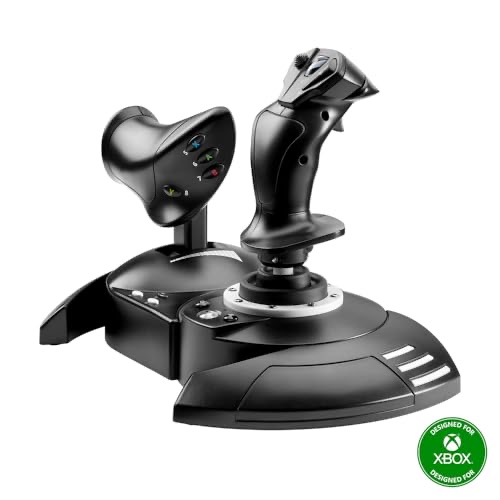
Xbox and PC compatible HOTAS with a wider button layout than the HOTAS X. Detachable throttle with a slightly improved rail mechanism and five axes total.
Best for: Xbox Flight Simulator players who need a console-compatible HOTAS under $100
Functionally, this is the HOTAS X redesigned for Xbox compatibility with two extra buttons added to the layout. The throttle rail is marginally smoother than the X model, though still plastic-on-plastic without real dampening. What makes it worth the $15 premium is Xbox support. MSFS on console does not recognize many PC-only peripherals, so your HOTAS options are limited, and this is the most affordable one that works out of the box. On PC, the extra cost over the HOTAS X is harder to justify since both use the same sensor technology and T.A.R.G.E.T. software. The main drawback is longevity. Reports of stick drift appearing after 8 to 12 months of regular use are common enough to mention, particularly on the twist axis. Budget accordingly for an eventual upgrade.
Mid-Range HOTAS ($145 - $310)
This is where flight sim gear gets serious. Hall-effect sensors replace potentiometers, metal components start appearing in critical joints, and software ecosystems open up deeper customization. If you have been simming for a few months and know you are sticking with it, this tier represents the best value per dollar in the entire market.
Thrustmaster TCA Officer Pack Airbus
~$145 on Amazon
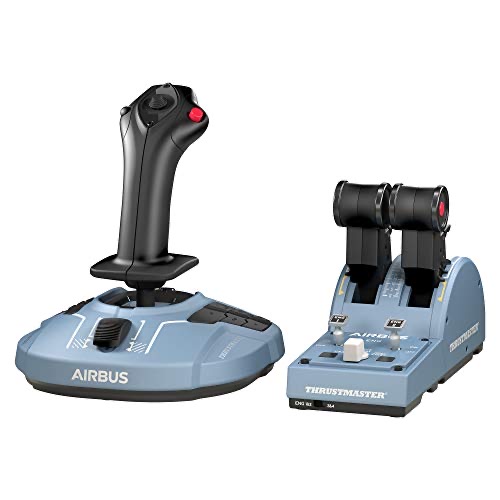
Airbus-replica sidestick and throttle quadrant with detent notches for idle, climb, flex, and TOGA. Designed specifically for airliner simulation in MSFS and X-Plane.
Best for: Airliner sim pilots flying A320 and A350 routes in MSFS or X-Plane
Thrustmaster built this set around the Airbus sidestick form factor, and the detented throttle quadrant is the star of the package. Those physical notches for CL, FLX, and TOGA positions make autothrottle management feel tactile in a way that a smooth-slide throttle never achieves. Hall-effect sensors on both units mean no potentiometer drift over time. The catch is versatility. The sidestick grip is compact and designed for Airbus fly-by-wire logic, which means minimal force feedback and limited button count compared to a traditional center stick. Flying military jets in DCS with this setup feels wrong because the grip shape and button placement do not map well to combat aircraft. Buy this if airliners are your primary focus. For anything else, the T16000M below is the better all-rounder.
Thrustmaster T16000M FCS HOTAS
~$165 on Amazon
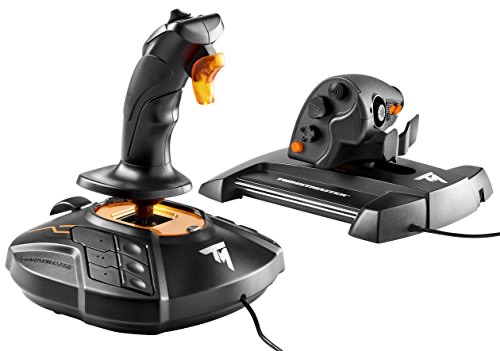
A versatile HOTAS pairing a 16-bit Hall-effect joystick with a TWCS throttle featuring a mini-stick and rocker. The go-to recommendation for serious beginners and mid-level simmers.
Best for: Simmers who fly both combat (DCS) and civilian (MSFS) and want one setup that handles everything
The T16000M FCS sits at the intersection of price and performance that makes it the default recommendation across nearly every flight sim forum. The joystick uses a 16-bit Hall-effect sensor (the same technology found in sticks costing three times as much), delivering smooth, drift-free axis readings from day one. The TWCS throttle adds a paddle rocker for rudder input and a thumb mini-stick for radar slew or view control. Between both units, you get enough axes and buttons to fully bind an F/A-18C in DCS without touching the keyboard. The known weakness is the TWCS throttle rail. Out of the box, it uses a grease that dries out within a few months, causing the slider to become sticky and inconsistent. The community fix is a $12 Nyogel dampener kit that smooths it out permanently, but you should not need an aftermarket mod on a $165 product. Factor that into the purchase price and this is still the best value in the mid-range.
Logitech X56 Rhino
~$250 on Amazon
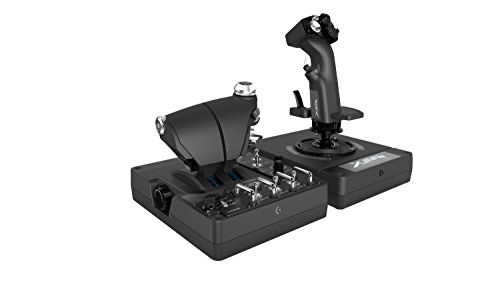
A feature-packed HOTAS with dual throttle levers, an analog mini-stick on the throttle, spring tension adjustment on the stick, and RGB lighting throughout.
Best for: Elite Dangerous and Star Citizen players who need twin throttle axes and maximum button count
Logitech inherited the X56 from Saitek, and the current revision addresses some of the earlier model's wiring issues. The dual throttle is the headline feature: two independent lever axes that split apart for differential engine management in twin-engine aircraft or lateral thruster control in space sims. Button count is enormous, with toggles, rotaries, and hats covering nearly every surface. The adjustable spring on the stick lets you dial tension from loose space-sim feel to stiff combat-sim resistance. Where the X56 stumbles is quality control consistency. Some units ship flawless, while others develop ghost inputs on the rotary encoders or stick jitter within the first year. Logitech's warranty support is hit-or-miss depending on the representative. At $250, that QC lottery is harder to stomach than it would be at $100. When you get a good unit, it is excellent. The gamble is whether yours will be a good one.
Turtle Beach VelocityOne Flightstick
~$310 on Amazon
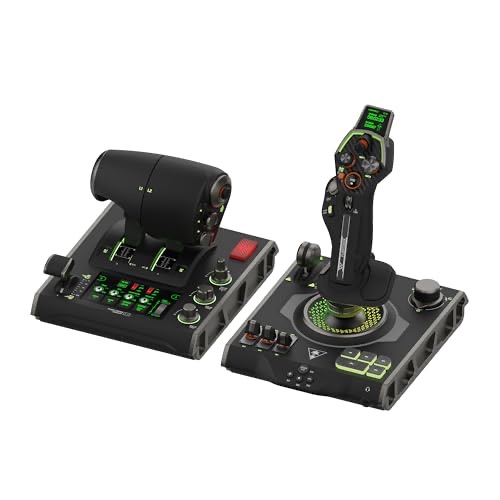
A modular flight stick with swappable grips, integrated throttle lever on the base, and Hall-effect sensors across all axes. Xbox and PC compatible with onboard profiles.
Best for: Xbox simmers who want Hall-effect precision and a modular grip system
Turtle Beach entered the flight sim market aggressively with the VelocityOne line, and this stick brings genuine innovation to the mid-range. The modular grip system lets you swap between a fighter-style grip and a civilian-style handle, which is a feature you typically only see on $400+ setups from VKB or Virpil. Hall-effect sensors across all axes match the T16000M's drift-free promise. Xbox compatibility is plug-and-play, making this one of the best console sim options available. The problem is the integrated throttle. Rather than a separate unit, the throttle lever sits on the stick base, which limits its travel length and puts it awkwardly close to the stick when your arm is on the grip. For a dedicated PC setup where you could buy a separate throttle, the T16000M FCS at $165 delivers nearly the same sensor quality with a proper standalone throttle. The VelocityOne makes the most sense if Xbox is your primary platform.
Premium HOTAS ($500 - $625)
Premium HOTAS setups are built for pilots who fly daily, run complex DCS modules with dozens of bindings, and need hardware that survives years of heavy use without developing dead zones or axis drift. Metal construction, ball-bearing gimbals, and replica-accurate grip layouts define this tier. The price jump from mid-range is steep, but the durability and feel difference is immediately obvious.
Thrustmaster HOTAS Warthog
~$500 on Amazon
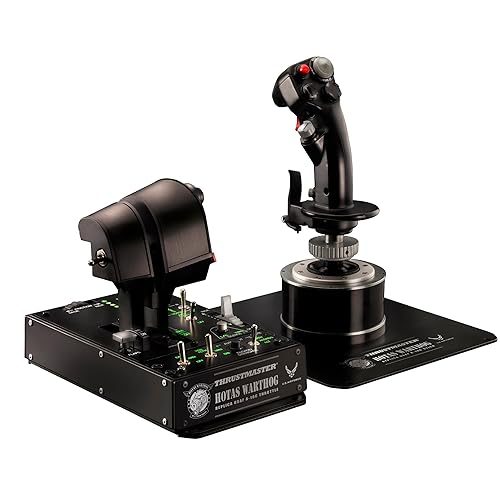
Full-metal replica of the A-10C Thunderbolt II stick and throttle. Dual throttle levers, 19 action buttons on the stick alone, and H.E.A.R.T. Hall-effect sensors throughout.
Best for: DCS pilots who fly the A-10C, F/A-18C, or F-16C and want a hardware-accurate control setup
The Warthog has been the benchmark premium HOTAS since 2010, and fifteen years later it still dominates the segment. The all-metal stick grip weighs over two pounds by itself, and that heft translates into a sense of authority that plastic sticks cannot replicate. Every button, hat, and toggle on both the stick and throttle maps directly to the real A-10C cockpit, which means DCS A-10C pilots can use their hardware bindings one-to-one with the virtual aircraft. The dual throttle handles split independently for differential engine control, and the friction adjustment lets you dial in resistance to your preference. The weakness that experienced users consistently flag is the stick gimbal. Despite the metal grip, the base uses a plastic gimbal mechanism with no centering spring adjustment and notable stiction at the center point. For the asking price, the gimbal should be ball-bearing metal. Many Warthog owners eventually replace the stock base with a VKB or Virpil gimbal, which adds another $150 to $250 to the total cost. If you plan to use the stock base long-term, be aware of this limitation.
Winwing Orion2 MAX HOTAS
~$625 on Amazon
F/A-18C replica stick and throttle with a metal ball-bearing gimbal, dry clutch throttle mechanism, and modular button plates. Ships direct from Winwing or through Amazon.
Best for: DCS Hornet pilots who want the most accurate F/A-18C replica controls available under $1,000
Winwing entered the premium HOTAS space and immediately challenged Thrustmaster's decade-long hold on the market. The Orion2 MAX fixes the Warthog's biggest flaw right out of the gate: a genuine ball-bearing metal gimbal with adjustable spring tension and damping. The stick movement is smooth, precise, and free of the center stiction that plagues the Warthog base. The throttle uses a dry clutch mechanism instead of friction rails, delivering consistent resistance across the full throw. Button placement mirrors the real F/A-18C cockpit, making it a one-to-one match for DCS Hornet operations. The downside is availability and support. Winwing is a Chinese manufacturer with limited Western distribution. Amazon stock is intermittent, shipping times can stretch to weeks, and warranty claims require international communication. Software updates and firmware tools are functional but less polished than Thrustmaster's T.A.R.G.E.T. ecosystem. If you can tolerate the logistics friction, the hardware itself outperforms the Warthog at a comparable price.
Yokes ($165 - $265)
Yokes are the correct input device for general aviation and airliner simulation. If you primarily fly Cessnas, Boeings, or any aircraft with a control column rather than a stick, a yoke gives you the right muscle memory and range of motion. They are not suited for combat aircraft, helicopters, or anything that uses a center stick.
Logitech PRO Flight Yoke
~$165 on Amazon
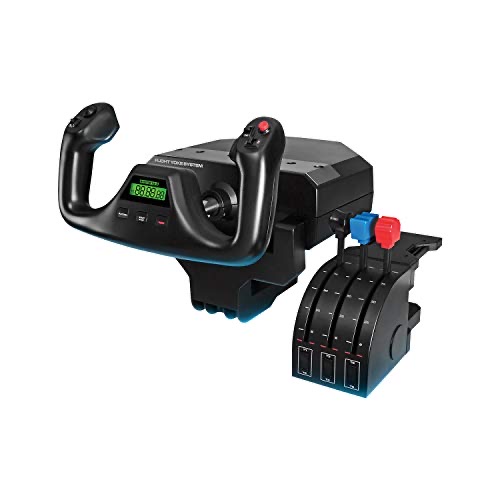
A desk-mount yoke with push-pull and rotation axes, built-in USB hub for connecting throttle quadrants and panels, and stainless steel shaft.
Best for: Casual GA pilots on a budget who want a functional yoke without spending $250+
The Logitech yoke has been a GA sim staple for years, and the built-in USB hub is a genuine convenience. Plug your throttle quadrant and switch panels directly into the yoke base, keeping cable management clean. The stainless steel shaft provides decent resistance on push-pull movements. However, the rotation axis uses a rubber band centering mechanism that wears out and develops a loose, sloppy feel within 12 to 18 months of regular use. Replacement bands are available, but you will need to disassemble the unit to install them. The potentiometers also develop dead spots over time, a problem that the Honeycomb Alpha solves with Hall-effect sensors. For $165, this works as a starting yoke, but serious GA simmers should save up for the Alpha.
Honeycomb Alpha Flight Controls
~$265 on Amazon
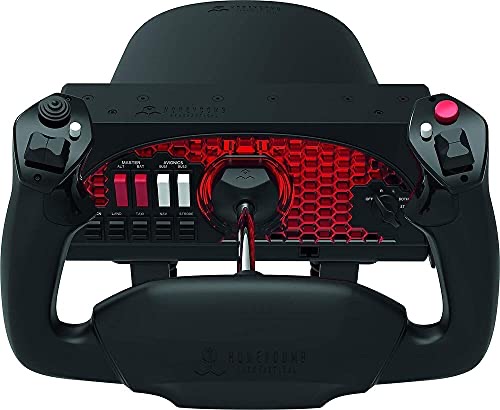
A premium yoke with integrated ignition switch panel, Hall-effect sensors, and a smooth dual-rail mechanism. The standard recommendation for dedicated GA simulation.
Best for: Dedicated MSFS and X-Plane GA pilots who want the best yoke under $300
Honeycomb disrupted the yoke market when the Alpha launched, and it remains the go-to recommendation for a reason. The dual-rail push-pull mechanism is smoother and more consistent than the Logitech's single-shaft design, and the Hall-effect sensors eliminate the dead zone and drift problems that plague potentiometer-based yokes. The integrated switch panel on the base includes ignition, master battery, alternator, avionics, and light switches that actually bind to sim functions, saving you $60 or more on a separate panel. Build quality is excellent for the price, with a solid clamp system that grips desks securely. The drawback is the rotation axis centering. While much better than the Logitech, it still uses a spring mechanism that some users find too strong at the center and too light at the extremes. There is no dampening adjustment. Paired with a Honeycomb Bravo throttle quadrant, this becomes one of the most complete GA setups available under $500 total.
Rudder Pedals ($90 - $475)
Rudder pedals handle yaw input and differential braking, two functions that twist sticks and keyboard keys handle poorly. If you are flying aircraft with significant rudder authority (warbirds, helicopters, taildraggers) or practicing crosswind landings, dedicated pedals make a major difference. The gap between budget and premium is wide in this category.
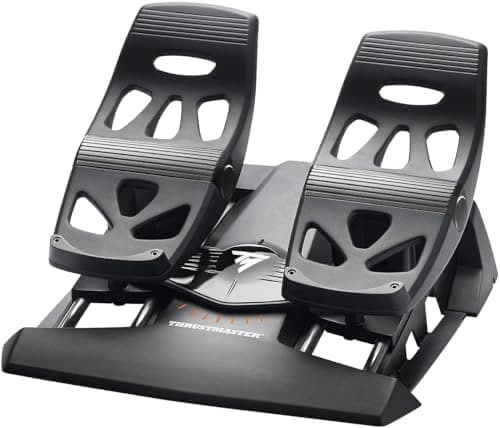
Thrustmaster TFRP Rudder Pedals
~$90 on Amazon
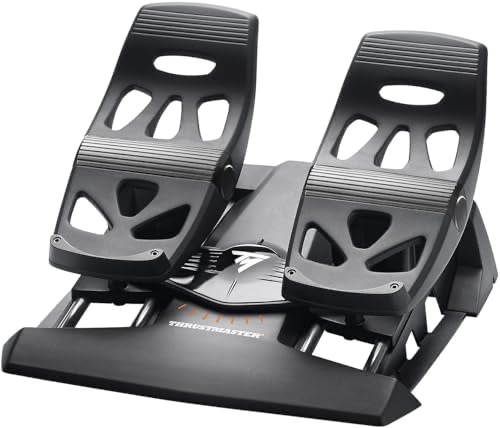
Entry-level rudder pedals with a sliding rail design and differential toe brake axes. Compatible with all Thrustmaster ecosystems via T.A.R.G.E.T. software.
Best for: Simmers adding rudder control for the first time without a major investment
The TFRP uses a sliding rail rather than the pivoting design found on more expensive pedals, which takes adjustment if you have used real aircraft rudder pedals. Your feet slide forward and back rather than pressing on a pivot point. This is not inherently worse for sim purposes, just different. The differential toe brakes work as expected, adding independent left and right brake axes for ground handling. Build quality is all plastic, and the pedals feel light under foot. On hard floors, the included mat helps prevent the base from skating around, though carpet provides better grip. The weakness is the rail smoothness. Over time, the plastic-on-plastic contact surfaces develop friction inconsistencies that introduce notchy spots in the travel. A silicone lubricant application every few months keeps them functional. At $90, these are the cheapest way to get proper rudder and brake axes, and they do the job adequately for casual flying.
Thrustmaster TPR Pendular Rudder
~$475 on Amazon
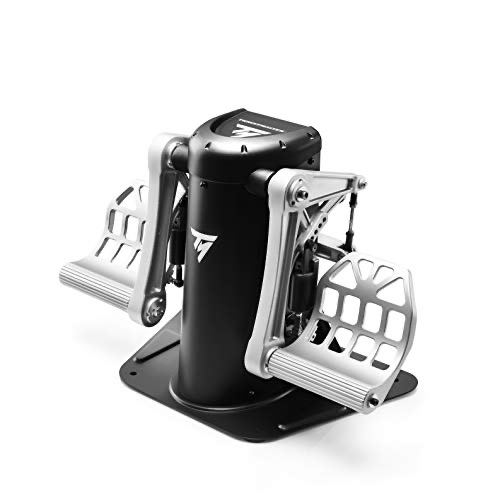
Industrial-grade pendular rudder pedals with S.M.A.R.T. Hall-effect sensors, adjustable pedal angle, and a solid metal frame weighing over 15 pounds. The reference standard for sim rudder control.
Best for: Dedicated sim pit builders who want lifetime rudder pedals with zero-drift precision
The TPR is a buy-it-once pedal set that should outlast multiple stick and throttle upgrades. The pendular mechanism replicates real aircraft rudder pedal motion, where the pedals pivot on a central axis rather than sliding on rails. This feels immediately natural if you have any real-world stick time. Hall-effect sensors deliver drift-free precision across the full travel, and the all-metal frame weighs enough that it stays planted without mounting hardware, though bolt holes are provided for permanent installation. Pedal angle adjusts to accommodate different leg lengths and seating positions. The drawback is the price-to-function ratio. At $475, these are rudder pedals. They control one axis. The TFRP at $90 controls the same axis and provides the same differential brake function, just with less precision and a cheaper feel. The TPR is worth it for sim pit builders who are already running a Warthog or Winwing setup, but pairing $475 pedals with a $55 HOTAS X would be absurd. Match your pedals to the rest of your hardware tier.
Head Tracking ($40 - $180)
Head tracking translates your real head movements into camera control inside the sim. Look left in your chair, your virtual pilot looks left. Glance down, you see the instrument panel. It is the single biggest immersion upgrade you can make after getting a HOTAS, and it costs less than most throttle units. Two technologies dominate: IR-based optical tracking and webcam-based software tracking.
S18 OpenTrack IR Camera
~$40 on Amazon
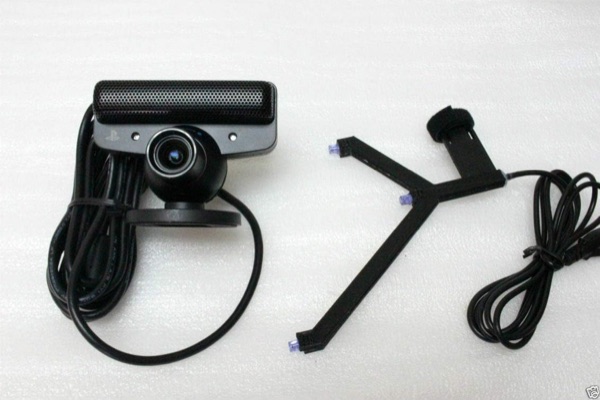
A budget IR camera designed for use with OpenTrack software. Requires a separate IR clip or LED array on your headset. Tracks at 120fps with a 75-degree field of view.
Best for: Budget-minded simmers who do not mind assembling a DIY IR clip from a few components
OpenTrack is free, open-source software that does the same fundamental job as TrackIR's proprietary solution. This camera serves as the sensor half of the equation, but you still need an IR emitter on your head, typically a 3-point clip that mounts to a headset. Some sellers bundle a basic clip, others sell the camera alone. Check the listing carefully before ordering. When properly set up with curve tuning, this combination tracks smoothly enough for DCS combat maneuvering and MSFS sightseeing alike. The weakness is the setup process. OpenTrack requires manual configuration of curves, dead zones, axis mapping, and filter tuning. There is no plug-and-play experience. Budget an hour for initial setup and expect to revisit the curves periodically as you refine your preferences. For $40 versus $180 for TrackIR, that setup time is a fair trade for many users, but if you want zero configuration hassle, look at the TrackIR 5 below.
TrackIR 5 + ClipPRO
~$180 on Amazon
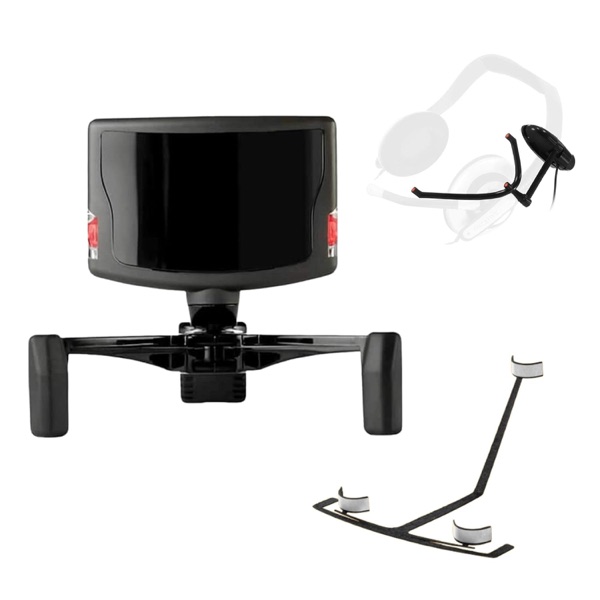
The industry-standard IR head tracking system. Includes the TrackIR 5 camera and active ClipPRO LED emitter. Native support in DCS, MSFS, X-Plane, and 200+ other titles.
Best for: Simmers who want plug-and-play head tracking that works out of the box in every major title
NaturalPoint has owned this market segment for over a decade, and TrackIR 5 remains the path of least resistance for head tracking. Install the software, clip the LED emitter to your headset, and it works in DCS, MSFS, X-Plane, IL-2, and hundreds of other titles without additional configuration. The 6DOF tracking covers all three rotation axes plus forward/back, left/right, and up/down translation, letting you lean into the gunsight or peek around the canopy frame. Default curves are usable immediately, though most users refine them over time. The weakness is the price relative to what you get. At $180, this is an IR camera and an LED clip with proprietary software. The OpenTrack setup above delivers 90% of the same performance for $40 plus some configuration time. TrackIR's value proposition is convenience and guaranteed compatibility, not raw tracking superiority. If that convenience matters to you, it is worth the premium. If you enjoy tinkering, save the $140.
VR Headsets ($300 - $500)
VR in flight simulation is a different experience entirely. Head tracking gives you camera control. VR puts you inside the cockpit. You look over your shoulder and see the tail. You glance down and read the instrument panel at scale. Depth perception makes formation flying and air-to-air refueling feel natural in a way that flat screens cannot replicate. The trade-off is resolution, comfort during long sessions, and the need for a powerful GPU to maintain smooth frame rates.
Meta Quest 3S
~$300 on Amazon
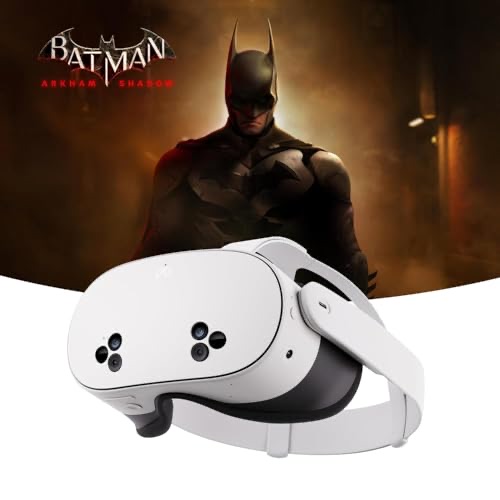
Standalone VR headset with PC tethering via USB-C or Air Link wireless. Snapdragon XR2 Gen 2 processor, pancake optics, and color passthrough for seeing your physical controls.
Best for: Simmers who want solid VR performance with the option to use it standalone for other VR content
The Quest 3S hits the sweet spot for sim VR entry. Tethered to a gaming PC via USB-C Link cable, it runs DCS and MSFS with visuals that are genuinely usable for reading cockpit instruments and spotting targets at distance. Air Link wireless mode eliminates the cable at the cost of slight latency and compression artifacts, which matter less in sim flying than in fast-paced VR games. Color passthrough is a game-changer for sim use specifically, because you can enable it to see your physical HOTAS, keyboard, and panels without removing the headset. The limitation is resolution. At the 3S price point, you get lower pixel density than the Quest 3, and fine cockpit text (CDU screens, radio frequencies, small gauge numbers) requires leaning in to read clearly. For simmers who spend hours reading instruments, this gets fatiguing. If cockpit readability is your priority and budget allows, step up to the Quest 3 below. If you want the VR experience at the most accessible price, the 3S delivers it.
Meta Quest 3
~$500 on Amazon
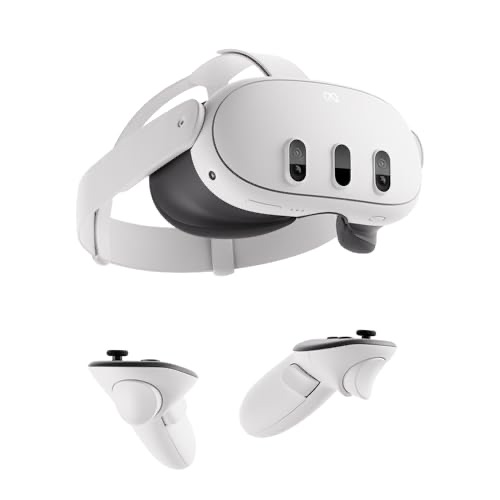
Higher-resolution version of the Quest platform with improved optics, wider FOV, and better GPU for standalone content. Same PC tethering options as the 3S.
Best for: Simmers who need to read small cockpit text clearly in VR without leaning forward
For sim flying specifically, the Quest 3's resolution bump over the 3S is not a minor upgrade. CDU text on the F/A-18C, radio frequency displays, and small-print instrument placards become legible without craning your neck forward. The wider field of view also improves peripheral awareness during combat maneuvering and formation flying. Pancake optics reduce the headset's bulk compared to older Fresnel designs, making it more comfortable during the 2 to 3 hour sessions that sim pilots tend toward. The weakness is identical to every current VR headset for sim use: GPU demand. Running MSFS 2024 or DCS at the Quest 3's full resolution requires an RTX 4070 or better to maintain smooth frame rates with reasonable settings. If your PC runs a mid-range GPU, you will be dialing settings down to a point where the resolution advantage over the 3S is partially lost. Check your hardware before spending the extra $200. An RTX 3060 paired with a Quest 3S will look better than an RTX 3060 struggling to feed a Quest 3 at full resolution.
Cockpit Panels ($68 - $150)
Dedicated panels add physical switches, knobs, and displays for functions you would otherwise bind to keyboard keys or click inside the virtual cockpit. They matter most in GA simulation where you are constantly managing radios, autopilot settings, and electrical systems. For military sim flying, most bindings live on the HOTAS itself, making panels less essential but still useful for startup procedures and radio management.
Logitech Flight Switch Panel
~$68 on Amazon
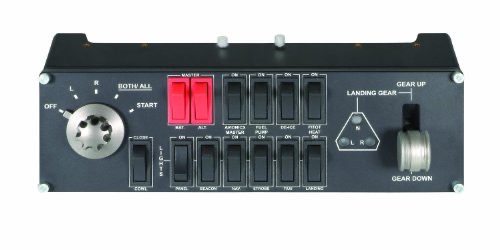
Physical toggle switches for magnetos, master battery, alternator, fuel pump, de-ice, pitot heat, avionics, and lights. LED indicators show active states. Stackable with other Logitech panels.
Best for: GA sim pilots building a startup and systems management panel stack
Flipping a physical magneto switch during engine startup is one of those small details that transforms a sim session from "playing a game" into "running a procedure." The switch panel covers the essentials for GA operations, and the landing gear lever with position indicators adds to the cockpit feel. Stackable mounting brackets let you combine it with the radio and multi panels below into a unified panel stack. Compatibility is broad, covering MSFS, X-Plane, and Prepar3D through FSUIPC or native support. The weakness is the switch quality itself. The toggles are lightweight plastic that lacks the satisfying weight and click of real avionics switches. For $68 that is expected, but if you have ever handled actual aircraft switches, these will feel like toys in comparison. They function correctly and that is what matters, but managing expectations on tactile feel is fair.
Logitech Flight Radio Panel
~$145 on Amazon
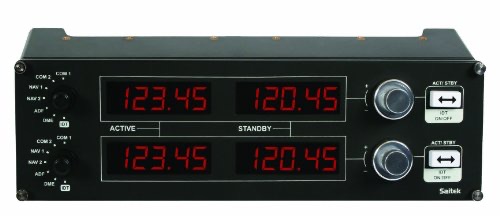
Dual LCD displays showing active and standby frequencies, with rotary encoders for tuning. Swap button toggles between frequencies. Supports COM and NAV radios.
Best for: IFR sim pilots who tune radios frequently and want physical knobs instead of mouse clicks
Radio tuning is one of the most mouse-click-intensive tasks in GA simulation, especially during IFR flights where you are constantly swapping between approach, tower, and ground frequencies. Having physical knobs that click through frequencies and LCD displays showing active/standby pairs eliminates the need to zoom into the virtual cockpit radio stack. The rotary encoders have a decent detent feel, and the swap button between active and standby works intuitively. The downside is the price relative to what it does. At $145, this is a single-function panel that handles COM1/COM2/NAV1/NAV2 tuning and nothing else. That is a lot of money for four radio channels when free alternatives like FSUIPC key bindings or a tablet running Air Manager can accomplish similar functionality. It makes the most sense as part of a full Logitech panel stack where the combined setup justifies the per-panel cost.
Logitech Flight Multi Panel
~$150 on Amazon
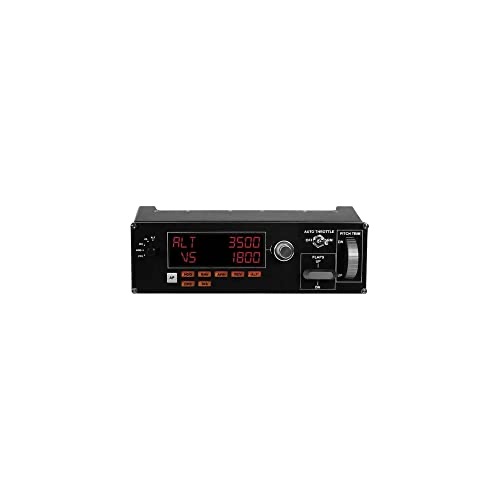
Autopilot control panel with rotary selectors for altitude, VS, heading, airspeed, and course. Physical buttons for AP engage, NAV, APR, REV, and flight director modes.
Best for: Airliner and IFR GA pilots who manage autopilot settings constantly during cruise and approach phases
Autopilot management is the most repetitive interaction in cruise flight, and this panel turns those constant mouse clicks into quick physical inputs. Dialing in a new altitude with a rotary encoder while keeping your eyes on the instruments is faster and more immersive than clicking the virtual panel. The trim wheel on the right side adds manual pitch trim, which is useful for GA aircraft without autotrim. AP mode buttons have status LEDs, so you can confirm which modes are active at a glance. The weakness is the same as the radio panel: value for money. At $150, a dedicated autopilot panel is a luxury item that mainly benefits long-haul airliner pilots. If you fly 30-minute GA hops, you will barely use it. The LCD is also small and difficult to read from more than about 18 inches away, which can be a problem depending on your desk layout. Best purchased as part of the full three-panel stack where total functionality justifies the combined $360 investment.
DCS vs MSFS: Which Sim Needs What Gear
The gear you need depends heavily on which sim you fly. DCS World and Microsoft Flight Simulator attract different audiences with different input requirements, and buying the wrong hardware for your preferred sim wastes money.
DCS World (Combat Simulation)
DCS is a study-level military flight sim where you operate every switch, sensor, and weapons system in the cockpit. A single aircraft module like the F/A-18C Hornet has over 300 bindable functions. This drives specific hardware needs:
- HOTAS is essential. A center stick and separate throttle replicate the real cockpit layout. The more buttons on your grip, the fewer keyboard commands you need mid-combat. The Warthog and Winwing Orion2 shine here because their button layouts map directly to real airframes.
- Head tracking or VR is nearly mandatory. Air combat requires constant visual scanning. Checking your six with a hat switch is workable but slow. TrackIR or VR lets you track a bandit through a turn fight while your hands stay on the controls.
- Rudder pedals matter for warbirds and helicopters. The P-51D Mustang's torque roll on takeoff and the Huey's anti-torque pedal work require dedicated rudder input. A twist stick handles it in a pinch, but pedals give the fine control these aircraft demand.
- Cockpit panels are optional. Most DCS functions bind to HOTAS buttons. Panels are useful for startup procedures but not combat.
Microsoft Flight Simulator 2024 (Civilian Aviation)
MSFS focuses on the full spectrum of civilian flying, from bush planes to 747s. The input requirements are different:
- A yoke makes sense for GA and airliners. If you fly Cessna 172s, Boeing 737s, or similar aircraft, a yoke matches the real control input. Sticks work too, but the muscle memory is different.
- Throttle quadrants with multiple axes help. Airliners need thrust levers, prop controls, and mixture management. A HOTAS throttle with a single axis is limiting. Dedicated quadrants like the Honeycomb Bravo provide the correct multi-lever setup.
- Cockpit panels add the most value here. Radio tuning, autopilot management, and systems switches are constant tasks in IFR flying. Physical panels reduce mouse clicking significantly.
- VR or head tracking is nice but not critical. MSFS is as much about sightseeing as flying. A good ultrawide monitor delivers the visual experience without the resolution compromises and comfort limitations of current VR headsets.
- Rudder pedals matter for crosswind landings. If you practice realistic landings with weather enabled, pedals give you the yaw authority that a twist stick handles poorly.
Both Sims
If you split time between DCS and MSFS, the T16000M FCS HOTAS is the most versatile single setup. It handles combat stick inputs and civilian throttle management equally well. Add TrackIR 5 for DCS dogfighting and a Honeycomb Alpha when you want to fly airliners. Building outward from a flexible core saves money versus buying specialized gear for each sim.
Building Your First Sim Pit
A sim pit does not start with a $3,000 cockpit frame and six monitors. It starts with a joystick and evolves over months or years as you figure out what matters to your flying style. Here is the typical progression, based on how most sim pilots actually build out their setups:
Stage 1: Desk Setup ($55 - $165)
Start with a stick or HOTAS on your desk. The T-Flight HOTAS X at $55 or the T16000M FCS at $165 covers this stage. Fly for a month. Figure out whether you prefer combat or civilian flying, short hops or long-haul flights. This determines every subsequent purchase.
Stage 2: Head Tracking ($40 - $180)
Add head tracking before spending more on controls. The immersion jump from a static view to head-tracked camera control is larger than upgrading from a $55 stick to a $500 one. OpenTrack at $40 or TrackIR 5 at $180 depending on your tolerance for configuration.
Stage 3: Rudder Pedals ($90 - $475)
Once head tracking shows you what you have been missing visually, rudder pedals do the same for yaw control. The TFRP at $90 works for most pilots. Upgrade to TPR only if you are building a permanent sim pit where the pedals bolt down.
Stage 4: Mounting ($100 - $400)
Desk clamps and chair mounts transform the ergonomics. Products like the Monstertech or J-PEIN mounts position your stick and throttle at the correct height and angle, eliminating the wrist strain of reaching up to a desk surface. This is the stage where sim flying starts feeling like sitting in a cockpit rather than playing a game at a computer.
Stage 5: Premium Controls or VR ($300 - $700)
Now you know what you fly, how you fly, and what your setup needs. Upgrade to a Warthog or Winwing if DCS is your focus. Add a Honeycomb Alpha and Bravo if MSFS GA is your thing. Or invest in a Quest 3 for full VR immersion. Do not try to buy everything at once. Each stage reveals what you actually need next.
Frequently Asked Questions
Do I need a HOTAS for DCS World, or can I use keyboard and mouse?
You can technically fly with keyboard and mouse, but DCS is designed around HOTAS input. Air-to-air combat requires simultaneous control of pitch, roll, yaw, throttle, and weapons systems. With a keyboard, you are toggling between discrete inputs rather than managing continuous analog axes, which puts you at a severe disadvantage in any multiplayer scenario. Even a budget $55 HOTAS X transforms the experience. Mouse-only works for learning cockpit switches and procedures on the ground, but once you are flying, physical controls are effectively required.
What is the difference between Hall-effect sensors and potentiometers?
Potentiometers use a physical wiper that slides along a resistive strip to measure position. Over time, the wiper wears a groove into the strip, creating dead spots and jitter in the axis reading. This is the "stick drift" that budget joystick owners complain about after 6 to 12 months. Hall-effect sensors measure position using magnetic fields with no physical contact between components. Nothing wears, so the axis remains smooth and accurate for the life of the product. The T16000M, Warthog, and all Winwing products use Hall-effect sensors. Budget sticks like the Extreme 3D Pro and HOTAS X use potentiometers.
Is VR worth it for flight sims in 2026?
VR is worth it if you have the GPU to support it and accept the trade-offs. The immersion is unmatched for combat and formation flying, and depth perception alone justifies the purchase for air-to-air refueling practice. The downsides are real, though. Current headsets still lack the resolution to comfortably read small cockpit text for hours, comfort degrades after 90 minutes for most users, and you need at minimum an RTX 4070 to maintain acceptable frame rates in DCS or MSFS 2024. Head tracking (TrackIR or OpenTrack) delivers 70% of the situational awareness benefit at 20% of the cost and GPU requirement. Many experienced sim pilots use head tracking for daily flying and switch to VR for specific missions where immersion matters most.
Can I use a HOTAS with Xbox?
Only specific models are Xbox-compatible. The Thrustmaster T-Flight HOTAS One, Turtle Beach VelocityOne series, and Thrustmaster TCA Officer Pack all work with Xbox consoles. Standard PC-only HOTAS setups like the T16000M FCS, Warthog, X56, and Winwing products are not recognized by Xbox. There is no adapter or workaround. If you play MSFS on Xbox, check compatibility before purchasing. The HOTAS One at $70 is the cheapest option, and the VelocityOne Flightstick at $310 is the most capable.
How much desk space does a HOTAS setup need?
A basic two-piece HOTAS (stick plus throttle) needs roughly 24 inches of width and 12 inches of depth, assuming the units sit side by side in front of your monitor. Adding rudder pedals requires 18 to 24 inches of floor space between your chair and desk. Cockpit panels stack vertically and take about 6 inches of width per panel. If desk space is tight, consider chair-mounted or under-desk clamp solutions from companies like Monstertech, which move the controls off the desk surface entirely. Many sim pilots use a 48-inch desk as the minimum comfortable size for a full HOTAS and monitor setup.
Do I need rudder pedals, or is a twist stick enough?
A twist stick handles rudder input adequately for jets and most modern aircraft where rudder use is minimal. You apply rudder for coordinated turns and crosswind corrections, and a twist axis covers that. Where pedals become important is with high-torque propeller aircraft (WW2 warbirds, bush planes) and helicopters, where constant fine rudder adjustments keep the aircraft coordinated. Trying to manage a P-51D takeoff with a twist stick while also making precise pitch and roll inputs is awkward because you are rotating and deflecting the same handle simultaneously. If warbirds or helicopters are your focus, budget for pedals early. For modern jet flying, a twist stick is fine until you decide to upgrade.
What GPU do I need for VR flight simulation?
For DCS World in VR, an RTX 4070 or better provides a smooth experience at medium-to-high settings with the Quest 3. An RTX 3070 works but requires noticeable settings compromises. For MSFS 2024 in VR, the GPU requirement is even steeper due to the scenery rendering load, and an RTX 4070 Ti or better is recommended for a comfortable experience. Below an RTX 3060 Ti, VR in either sim becomes a slideshow at any meaningful quality level. If your current GPU falls below these recommendations, invest in head tracking instead. TrackIR or OpenTrack runs on any modern GPU and delivers strong immersion without the frame rate demands.
Should I buy Thrustmaster or Logitech for my first HOTAS?
At the entry level ($55 to $70), Thrustmaster's T-Flight series offers a better overall package than any Logitech joystick because you get a separate throttle unit included. Logitech's Extreme 3D Pro is cheaper at $33 but is a stick-only solution with a base-mounted throttle slider. In the mid-range ($165 to $250), Thrustmaster's T16000M FCS has better sensors (Hall-effect versus potentiometer) than the Logitech X56, but the X56 offers more buttons and dual throttle axes. For most beginners, Thrustmaster's T16000M FCS at $165 is the strongest starting point because it combines reliable sensors, a full HOTAS layout, and a mature software ecosystem at a reasonable price.
Where to Go from Here
Flight sim hardware is a rabbit hole with a very deep bottom. The good news is that you do not need to hit the bottom to have a great experience. A $165 T16000M FCS with a $40 OpenTrack camera puts you in a setup that most DCS and MSFS pilots would consider fully capable. Spend a few months flying before upgrading further, because your preferences will change as your skills develop.
If you are into the aviation hobby beyond simulation, our guide to the best aviation radio scanners covers monitoring real ATC and military traffic. Heading to a real airshow? Our airshow essentials gear guide has you covered. And if you are shopping for someone who already has the perfect sim pit, our Father's Day gifts for military enthusiasts guide has options that go beyond the cockpit.